
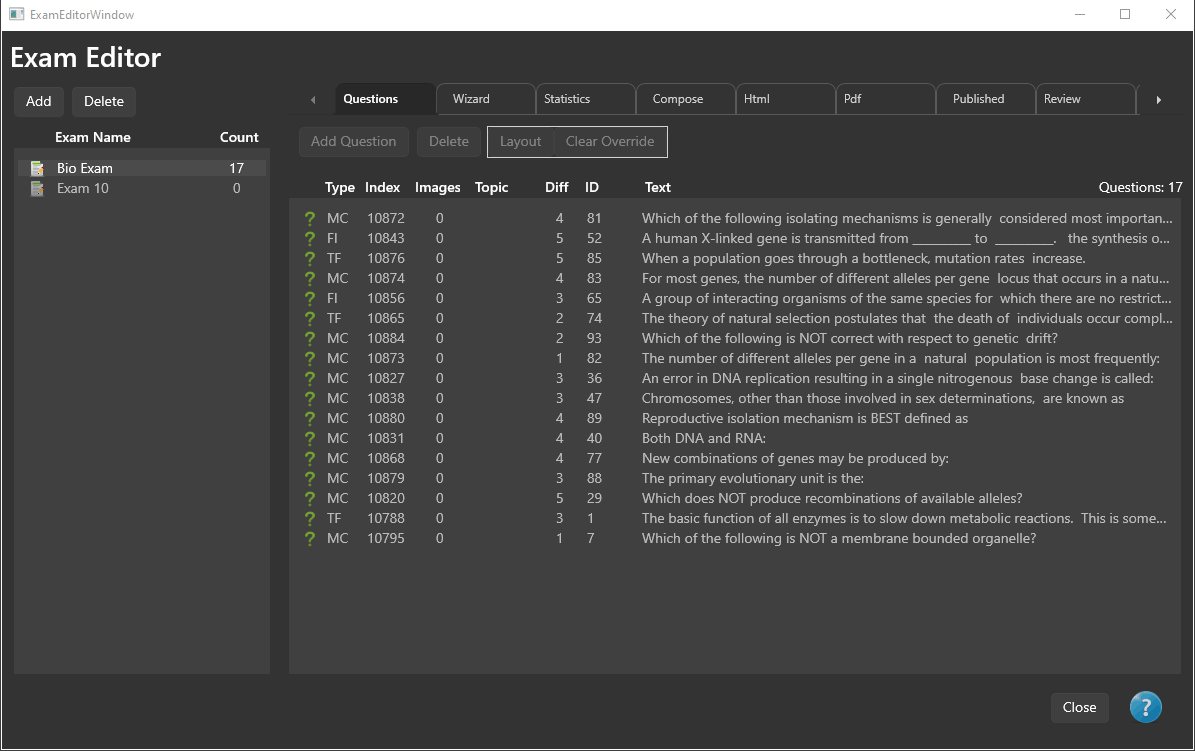
The Exam Editor is where exams are created, organized, composed, published, and managed.
Whether you are creating a single custom exam or generating multiple randomized exam forms, nearly all exam-related tasks are performed from this window.
From the Exam Editor you can:
- Create new exams.
- Build exams manually or automatically.
- View exam statistics.
- Compose exams for publishing.
- Publish HTML and PDF exams.
- Review published exams.
- Manage previously published exams.
Creating Exams
PrimeExam provides two methods for creating exams.
Create an Exam Manually
Manual exam creation allows you to choose exactly which questions appear on the exam.
Questions are selected from one or more question banks and added directly to the exam.
For detailed instructions, see Create Exam Manually.
Random Exam Wizard
The Random Exam Wizard automatically selects questions according to criteria that you specify.
Selection criteria may include:
- Question type
- Difficulty level
- Topics
- Resources
The wizard is particularly useful for generating multiple equivalent exams or practice exams from large question banks.
For more information, see Random Exam Wizard.
Exam Statistics
The Exam Editor provides statistical information describing the composition of the current exam.
Statistics help verify that the exam contains the desired balance of question types, difficulty levels, topics, and other attributes before publication.
For more information, see Question Bank Statistics.
Composing an Exam
Before an exam can be published, it must first be composed.
During composition you specify how the published exam will be generated.
Composition options include:
- Number of exam forms.
- Shuffle questions.
- Shuffle answer choices.
- Answer key options.
- Miscellaneous publishing options.
Composition prepares the logical structure of the published exam but does not generate the final files.
For complete details, see Exam Composition.
Publishing an Exam
Publishing generates the finished exam files.
PrimeExam can publish:
- HTML exams.
- PDF exams.
- HTML answer keys.
- PDF answer keys.
Publishing options allow you to configure:
- HTML layout settings.
- PDF layout settings.
- Margins.
- Choice indentation.
After publishing, the generated files are available for review and printing.
For complete details, see Exam Publishing.
Reviewing Published Exams
After publishing, the generated exam files may be reviewed directly within PrimeExam.
The Review tab allows you to:
- View HTML exams.
- View PDF exams.
- View HTML answer keys.
- View PDF answer keys.
- Print published exams and answer keys.
For more information, see Review Exams.
Managing Published Exams
The Published tab provides tools for managing previously published exams.
From this page you can:
- View published exams.
- Print published exams.
- Print answer keys.
- Copy published exam files to another location.
- Remove published files.
- Delete and restore published exam records.
For more information, see Manage Published Exams.
Typical Workflow
Most users follow this sequence when creating an exam:
- Create a new exam.
- Add questions manually or use the Random Exam Wizard.
- Review the completed exam.
- Compose the exam.
- Configure HTML and PDF publishing options.
- Publish the exam.
- Review and print the published files.